

 EN
EN

Heartopia


Written by
Heartopia is one of the most accomplished mobile cozy games in terms of building and decorating a house. But building a house can seem complex at first. And as your adventure progresses, new features will become available. This guide covers everything from the first piece of furniture to be installed, right through to the ultimate customisation of your Heartopia house.
The first step is to unlock your Heartopia house. Rest assured, you'll get your very first 'home' very quickly, within minutes of arriving on the island.
You now have your own house in Heartopia. But at the start, it's empty and you'll certainly want to decorate and furnish it - and to do that, you'll need furniture!
There are various ways of obtaining furniture for your Heartopia house.
As soon as you start playing, Bob will give you the first piece of furniture to make. To do this, you'll first need to make the Workbench. This will unlock the "Recipe Book" menu in your connected watch.
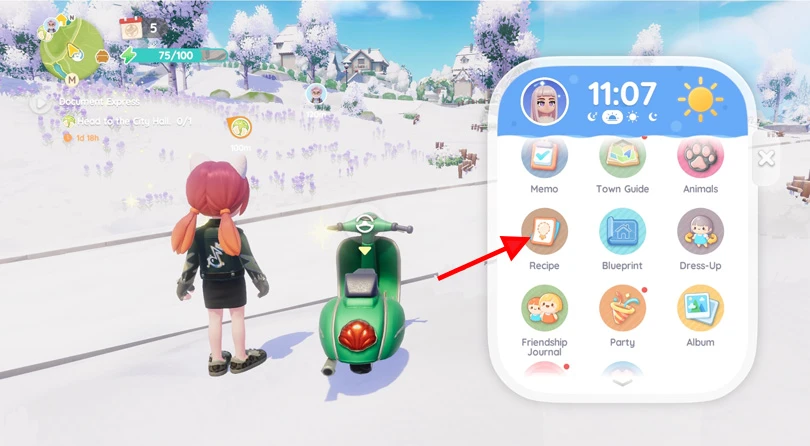
How do I unlock other "crafting recipes"?
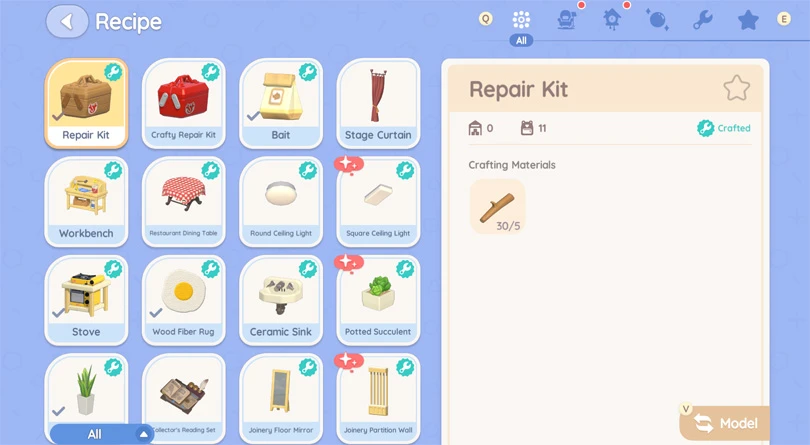
To make a piece of furniture, simply go to the Workbench and choose the piece you want to build. Please note: you'll need the necessary materials. You can also dye your furniture at the Workbench. But to do that, you'll need to get some dye, either as a quest reward or by buying it from Ka Ching.
⚡ Our tip: pick up the Heartopia codes! They give you rewards, including crafting materials.
Bob will soon invite you to visit him in his shop in the town centre. In his shop, you'll find the Showroom, where you can buy new furniture with gold coins or lucky stars.
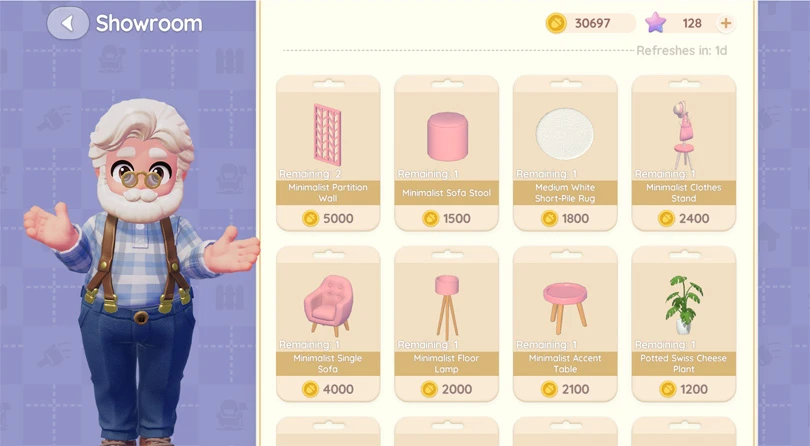
The Showroom, and therefore the choice of furniture, changes daily. Visit Bob regularly!
Furniture sets are, as the name suggests, a set of furniture for a living room, bedroom, study, etc. All you have to do is arrange the furniture in your home.
Please note: You'll need to make, buy or obtain each item in a set before you can use it in your Heartopia house.
You can get furniture sets:
⚡ To go further: The manufacture of some furniture requires roaming oak timber. Discover our guide, to find Slippery Oak!
The Acorn Store is the game's gacha system, and you'll need Exhibition Passes to try your luck via a draw system and get a furniture set. The furniture in the Store changes with the seasons and unlocks themed furniture.
Now you know how to get furniture for your Heartopia house. Now let's get down to the nitty-gritty: Construction Mode. To access it, simply click on the dedicated icon on the right of your screen.
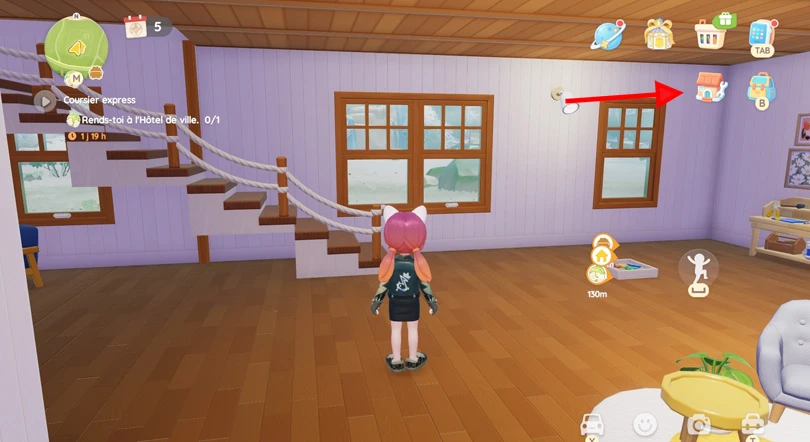
When you access this mode, you'll be able to arrange a number of items:
⚡Our advice : for an even easier way to get to grips with construction mode, I'd recommend playing Heartopia on PC!
Now it's up to you to get creative and personalise your house in Heartopia. Here are a few tips and tricks for getting to grips with construction mode.
There are two views of construction mode:
I strongly recommend that you use the top view to lay out the furniture and materials in your Heartopia house. It's much simpler and easier to use!
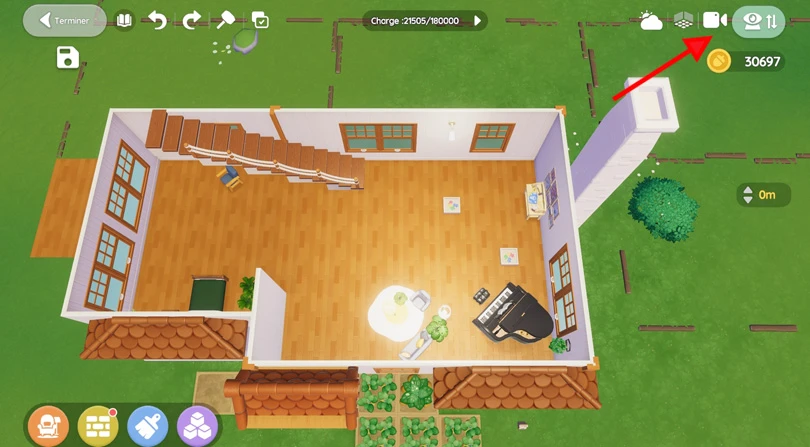
Heartopia offers an advanced level of home design. You can completely redesign the interior:
⚡ Warning: to extend your home, you need to unlock new home plots! We explain how to do this, in our guide.
Co-op construction is unlocked as soon as you reach D. G. Member level 8. This lets you build your house with another player!
Like co-op construction mode, blueprints are unlocked when you reach D.G. Member level 8. A new menu is then available on your connected watch. It's a very practical feature. It lets you:
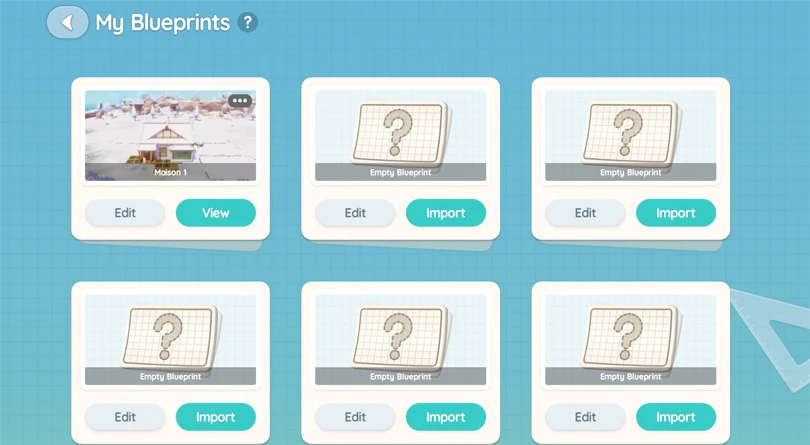
House blueprints give you unlimited use of your decorations and furniture. Above all, it's a feature that lets you plan your future layouts.
To conclude this ultimate guide to home design in Heartopia, here are my pro tips:
You now have all the knowledge you need to personalise your Heartopia house! The editors have prepared some other guides to help you make the most of your experience in the game:
Enjoy the game!
Follow us on our social networks to stay on top of mobile gaming news wherever you are!


Heartopia offers a highly advanced customisation feature: design patterns to personalise your wardrobe. But how do you unlock it? What tools do you need? Discov...
The Maltese x Heartopia collaboration has begun, and there are lots of surprises in store! Among them, new recipes to learn, each cuter than the next. But how d...
Birdwatching is one of Heartopia's specialities. In this relaxing activity, you'll be on the lookout for all the birds on the map. The european robin is one of...
Completing your collection of fauna in Heartopia is a real challenge. Certain insects only appear in certain places, under certain weather conditions or at cert...
In Heartopia, all the NPCs are important and have things to teach you, or to sell you. Vanya is the fishing mentor, one of the central NPCs in your favourite co...
Spring has sprung in Heartopia! And with it comes a new egg hunt event. But unlike the Winter Frost Season event, all the eggs can already be found. You've only...