



 EN
EN


Arknights: Endfield


Written by
Building and automating your AIC (Automated Industry Complex) is at the heart of the gameplay in Arknights: Endfield. But the whole mechanic can seem daunting! To create production lines without spending hours on them, blueprints are a great help. They allow you to save and share your constructions. In this guide, I'll explain how to unlock this feature, how to use it, and I'll share the Arknights: Endfield blueprints codes with you .
You'll need to play for a few hours before you can unlock the blueprints in Arknights: Endfield :
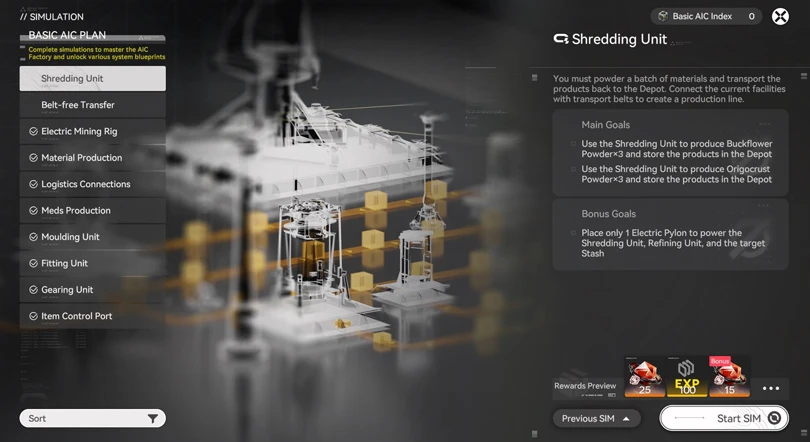
⚡ Mobi.gg tip: don't neglect the Simulations. I strongly advise you to do them all, it's an excellent way of getting to grips with automation.
As soon as you start the 'Lead the Way' quest and enter Simulation for the first time, you'll unlock a new menu in AIC mode: the blueprints for Arknights: Endfield. Initially, only the blueprints you have obtained in the Simulations will be available for designing your AIC base.
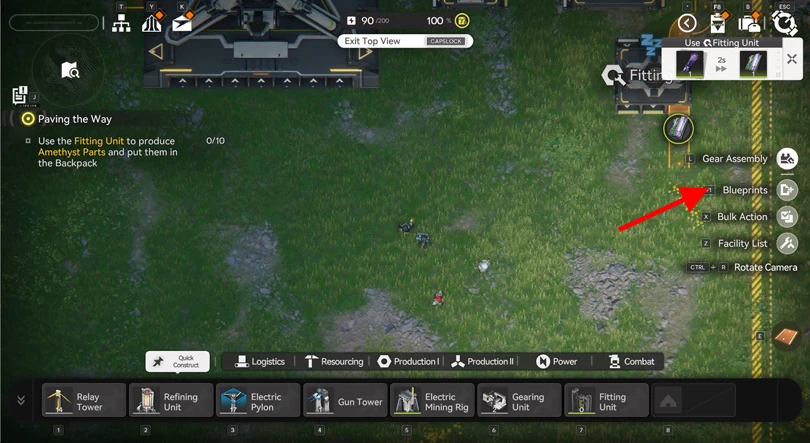
Now that you've unlocked the blueprints for Arknights: Endfield, you can create your own custom construction blueprints. Here's the step-by-step guide:
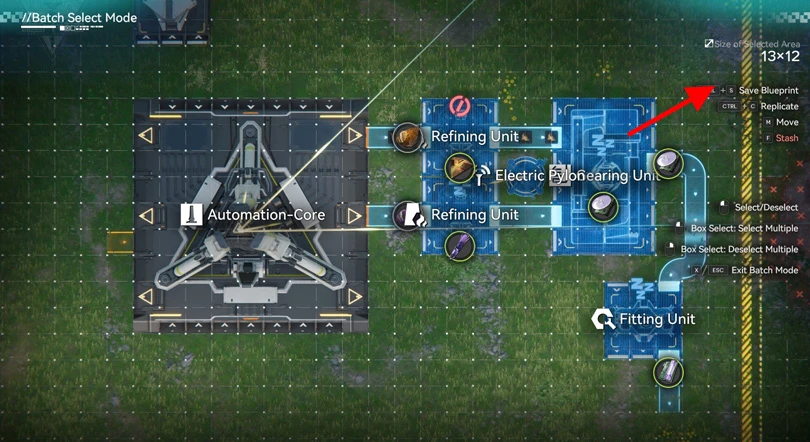
You can now give your blueprints a name before saving them.
⚡ Mobi.gg tip: include as much detail as possible in the description of your plan. This will make it easier for the players you're going to share it with to understand.
Your blueprints are now available in 'Blueprints', then 'My blueprints'.
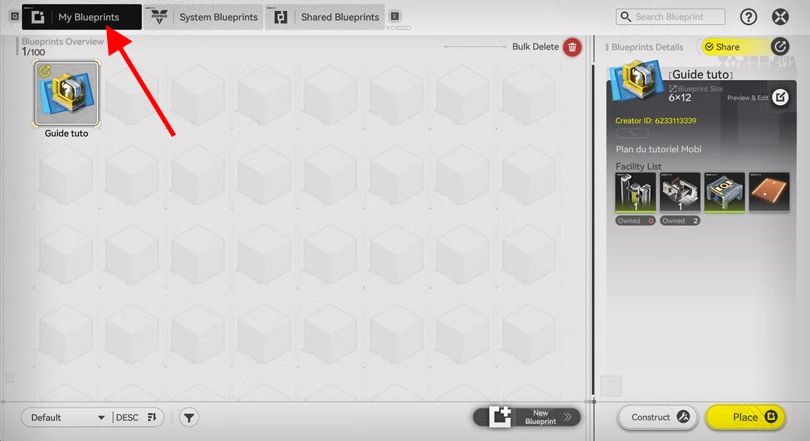
Please note: there are certain constraints when creating blueprints in Arknights: Endfield. You must first unlock the buildings in your inventory before you can place them in your AIC. The size of the AIC base is also limited.
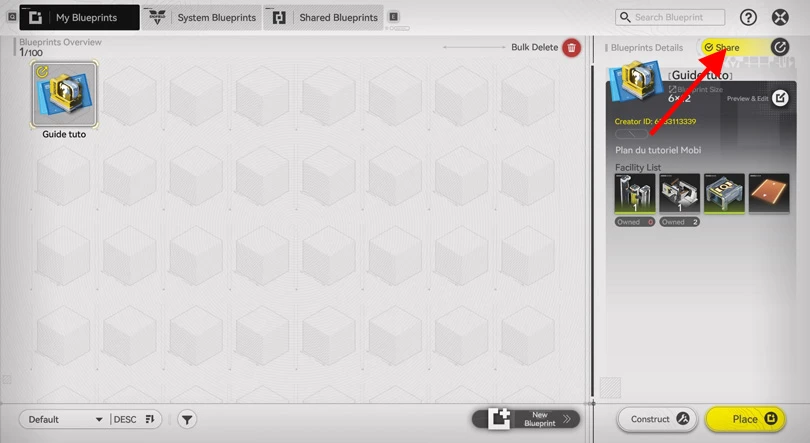
Have you created a blueprint in Arknights: Endfield? You can now share it with other players, using a code. Here's how to do it:
⚡ Mobi.gg tip: check out our list of Arknights: Endfield codes. Unlike blueprints codes, these don't let you pick up blueprints, but rewards that are essential for progressing in the game!
As you can see, the game generates a string of characters for each custom blueprint. If you can share your codes, you can also retrieve those of other players ! Here's how to import Arknights: Endfield blueprints:
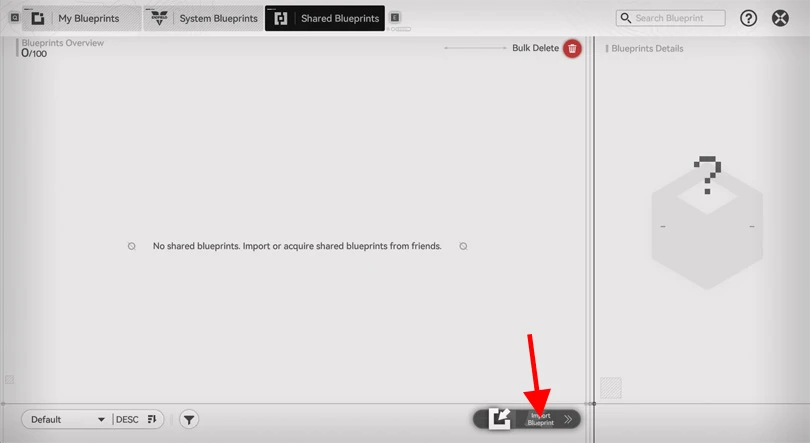
That's it, you've unlocked a new blueprints!
⚡ Mobi.gg tip: you'll need to unlock all the elements and materials in a shared blueprint, in order to use it!
Here is a non-exhaustive list of Arknights: Endfield blueprints to complete your AIC database:
| Construction | Code |
|---|---|
| Amethyst Materials | EFO01893u0E03415UI73 |
| Buck Capsule C | EFO01o083aOa8261IieO |
| Ferrium Materials materials | EFO012I45uAu4e83eIOo |
| LC Valley Battery | EFO011ea0ioia3Ue34O7 |
| Seed machine | EFO01Iao8151oE965o08 |
| Bottles and basics parts | EFO01E50U31O25o03oIa |
| Resource blueprints for beginners | EFO013o72I2588a90579 |
| Citrome, Aketine, Buckflower | EFO01Iao8151oE965o08 |
⚡ Mobi.gg tip: I'd advise you to join the official Arknights: Endfield Discord server. You'll find a channel there dedicated to sharing blueprints.
To finish off this guide to the blueprints in Aknights: Endfield, here are my tips for optimising your experience:
You now have all the information you need to use the blueprints in Arknights: Endfield. And to take things a step further, we've got some other guides for you:
Enjoy the game!
Follow us on our social networks to stay on top of mobile gaming news wherever you are!


Arknights: Endfield is the must-have gacha RPG, combining real-time strategic combat with basic management and automation. To get the most out of your experienc...
Unlike its predecessor, Arknights: Endfield is a real-time tactical RPG. Team composition is therefore at the heart of your gameplay. Managing combos, positioni...
Arknights: Endfield offers fast-paced, strategic combat, based on a team of 4 Operators. As Endministrator, you'll have to choose the best characters in the gam...
Arknights: Endfield, Gryphline's real-time strategy RPG, promises a vast world and advanced construction mechanics. But is it possible to discover Talos-II with...

Endfield is not a simple tower defence game like its big brother, but an ambitious 3D RPG with real-time exploration and strategic combat. This technological le...
You'll need a huge amount of resources to explore Talos-II in Arknights: Endfield. Looking for Oroberyl, Combat Records or Protoprisms? Then you've come to the...
Better graphics and performance 🚀
Even more epic battles ⚔️
Save your battery 🔋
Download on PC