



 EN
EN

Neverness to Everness


Written by
Fancy taking on Neverness to Everness, the anime version of GTA? Developed under Unreal Engine 5, the game can be quite demanding. If you want to get the most out of exploring Hethereau, here are the minimum and recommended Neverness to Everness system requirements for PC, Mac, Android, iOS and PS5.
Planning to play the game on your PC? Here are the minimum and recommended Neverness to Everness system requirements for your Windows machine.
| Component | Minimum system requirements | Recommended system requirements |
|---|---|---|
| Operating system | Windows 10 or 11 64 Bits | Windows 10 or 11 64 Bits |
| Processor | Intel Core i7-10700 (10th Gen) | Intel Core i7-12700 (12th Gen) |
| RAM | 16 GB | 32 GB RAM |
| Graphics card | NVIDIA GeForce GTX 1660 / AMD Radeon RX 5600 | NVIDIA GeForce RTX 3060 / AMD Radeon RX 6700 |
| Available space | 60 GB SSD | 60 GB SSD |
⚡ Mobi.gg's tip : install the game on an SSD rather than an HDD hard drive, otherwise loading times are likely to be quite long...!
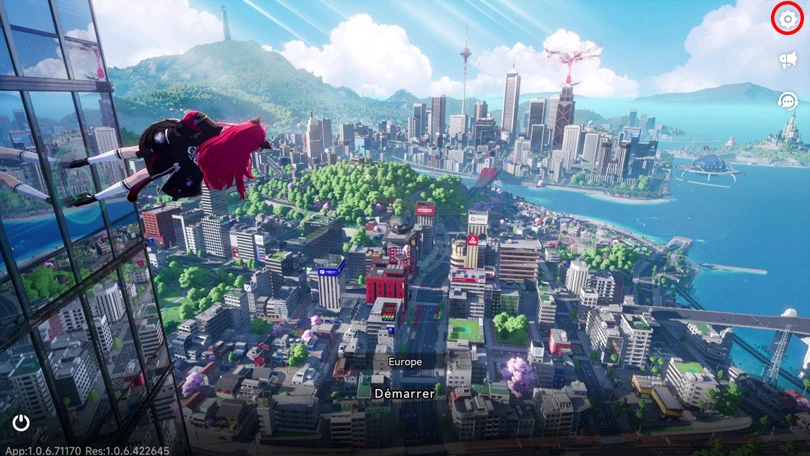
If you're having trouble getting Neverness to Everness to run on your PC, here are a few things you can do to make the game run more smoothly:
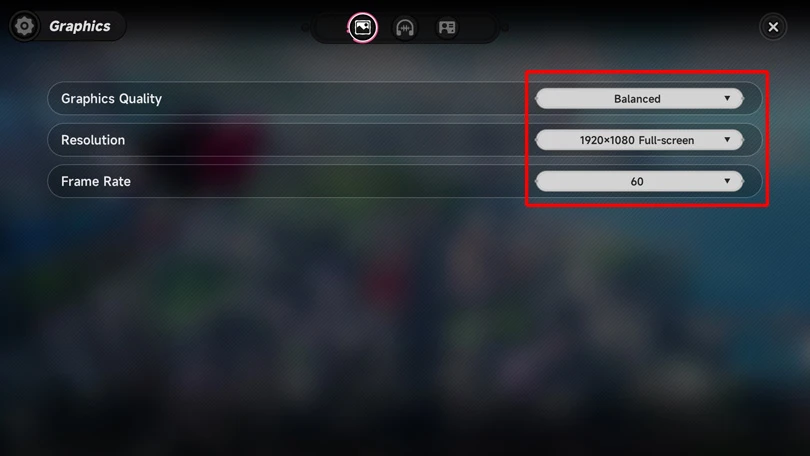
Good news for Mac users: it's possible to play Hotta Studio's game on an Apple computer! Here are the best Neverness to Everness system requirements on macOS:
| Component | Minimum system requirements | Recommended system requirements |
|---|---|---|
| Operating system | macOS 14.0 | macOS 26.4.1 |
| Chip | M1 or later | M5 |
| RAM | 4 GB | 4 GB RAM |
| Available space | 10GB | 10GB |
Here are the minimum and recommended Neverness to Everness system requirements for Android devices :
| Component | Minimum system requirements | Recommended system requirements |
|---|---|---|
| Operating system | Android 10.0 or HarmonyOS 2.0.0 | Android 11.0 or HarmonyOS 4.0.0 |
| Processor | Snapdragon 855, MediaTek Dimensity 8000 | Snapdragon 8 Gen 2, Snapdragon 8 Gen 3, MediaTek Dimensity 9200 |
| Memory | 8 GB or more | 8 GB or more |
| Storage | 20 GB or more | 20 GB or more |
Here are the recommended minimum system requirements for Apple devices. Unfortunately, the game will not run (or run poorly) on iPhones or iPads that are too old.
| Component | Minimum system requirements | Recommended system requirements |
|---|---|---|
| Operating system | iOS 15.0, IPadOS 15.0 or later | iOS 17.0, IPadOS 17.0 or later |
| Models | iPhone 14 | iPhone 14 Pro |
| Memory | 6 GB | 8 GB |
| Available space | 20 GB | 20 GB |
⚡ To go further: if your configuration is a little weak, you can also go to the game settings to lower the quality of the graphics and FPS.
You can play Neverness to Everness on PS5 or PS5 Pro, on any configuration. But be careful: you'll need 30 GB of storage space, or more!
Here are a few tips from Mobi.gg to make your NTE experience as smooth and enjoyable as possible.
You now know the minimum and recommended Neverness to Everness system requirements for running the game on your mobile, PC or PS5. Follow our optimisation tips to enjoy an excellent game experience!
Follow us on our social networks to stay on top of mobile gaming news wherever you are!


Shinku arrived in Neverness to Everness on 8 July 2026. She is the new character from the limited-time banner, and her unique feature is that she fights using a...
Did you love Neverness to Everness and want to find another game that’s just as original and packed with content? You’ve come to the right place! He...
Chaos arrived on 24 June 2026 in Neverness to Everness. He is the new character from the limited-time banner, whose unique feature is that he fights alongside a...
The Neverness to Everness Eternal waltz is one of the many Arcs available. What are its stats and effects? Which characters are best suited to this Arc, an...
Fadia is an enigmatic character in NTE who works for the Bureau of Anomaly Control. She is known for fighting with a huge cross-shaped shield. Here’s a Nevernes...
For the Long Dream quest, you need to meet Lacrimosa at the Neverness to Everness Kyllene Promenade. Mobi.gg shows you, step by step, how to find this location...
Better graphics and performance 🚀
Even more epic battles ⚔️
Save your battery 🔋
Download on PC