




 EN
EN


Cookie Run: Kingdom


Written by
We suggest you find out how to play Cookie Run Kingdom on PC or Mac. This way, you can more easily monitor the resources generated in your kingdom without fear of overheating your mobile's battery! To do this, we will need an Android emulator. Obviously, who else than BlueStacks to accompany us in this adventure! If you don't know this software, then you should know that you have here a free, secure, efficient and intuitive emulator. What's more, it works just as well on Mac OS as on Windows. Download Cookie Run Kingdom on PC
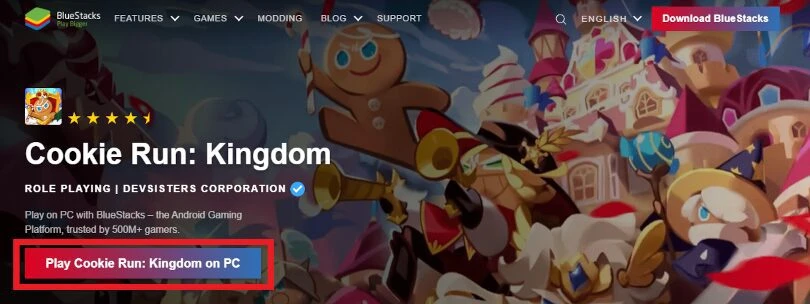
To begin, we invite you to go to this download page. From there you can click on "Play Cookie Run: Kingdom on PC". This will allow you to get the game as well as the BlueStacks emulator.
Once BlueStacks is downloaded, you can launch the freshly obtained file to start the installation. The installation is very simple and you just have to follow the instructions on the screen. Note however that BlueStacks will perform some tests to evaluate the performance of your machine. By doing so, it will be able to suggest the configuration it deems most suitable. So don't be surprised if the installation takes a little time at this point.
When the installation is complete, you can launch BlueStacks. We can only advise you to link your Google account to this emulator. The reason is simple: many applications have their backups linked to it. Thus, you will sometimes just have to install and launch applications on emulator to directly find your backups. This is one of the possible solutions for Cookie Run Kingdom!
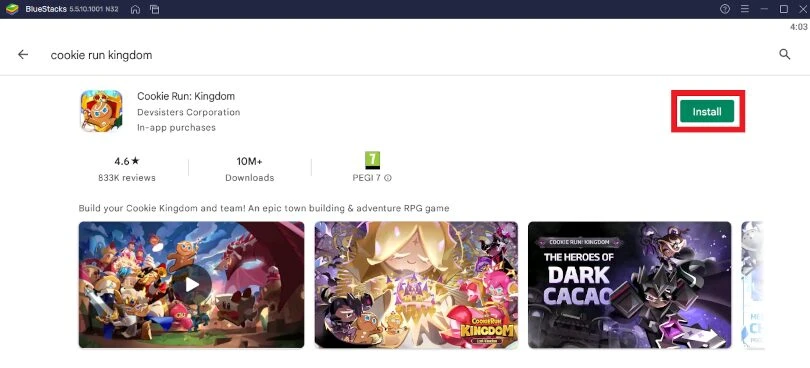
If, when you launched BlueStacks, you couldn't find the Cookie Run Kingdom application, then no worries! We will have to go to the Play Store to download Cookie Run Kingdom for PC. The procedure is the same as on mobile: launch the Play Store and carry out the search. Then, once you have found the game, simply click on "Install".
Now that you can play Cookie Run Kingdom on your PC, there is only one step left! You need to recover the progress you made on your mobile phone.
However, before we move on to the last part of this guide, we suggest youimprove the performance of your BlueStacks emulator. We invite you to consult our guide to optimising BlueStacks. Indeed, even if this emulator offers a parameter setting, certain adjustments allow you to push the software even further or to fix certain known problems. You can thus eliminate any form of lag, improve the visual rendering and fully enjoy this incredible Android emulator!
When you launch Cookie Run Kingdom PC on the emulator, the game itself will offer you to recover your backup via 4 means. You will have the choice to connect with a Google, Apple or Facebook account or by email. All you have to do is choose the method with which you started your game on your mobile. Then enter your login and password, and validate. This way, you will find your kingdom in the same state as you left it on your phone.

Note that if you have already linked your Google account to BlueStacks and your backup for Cookie Run Kingdom is via this method, then you only need to click on "Sign in with Google". BlueStacks will automatically and quickly take care of the rest!
Our guide to playing Cookie Run Kingdom PC is now complete. We hope you found it useful and that it will help you manage and transform your kingdom's resources, as well as deliver the world from darkness! Finally, if you enjoyed this experience, don't forget that BlueStacks allows you to play all the mobile games available on Android or iPhone. So don't hesitate to take advantage of it!
Using an emulator is perfectly legal as this software does not allow you to cheat and get any in-game advantages compared to mobile players. Indeed, BlueStacks will just simulate an Android environment on your computer.
You can perfectly transfer your Cookie Run Kingdom account from iOS to Android. The method is the same as for recovering your mobile progress on computer. We invite you to refer to the section of our article if you wish to do this.
Even if we mention "Cookie Run Kingdom PC", we must understand that we are referring to the Cookie Run Kingdom application installed on a computer via the Android emulator. The latter comes from the same Play Store as your mobile phone. It is therefore the same application running on a different medium.
To play Cookie Run Kingdom on PC with Bluestacks 5 emulator, the minimum system requirements are as follows
Here are the recommended settings to optimize your playing experience on Cookie Run Kingdom:
Follow us on our social networks to stay on top of mobile gaming news wherever you are!



In CRK, Treasures are really indispensable items. You can obtain them through draws, and their use affects your Cookies team. Treasures improve your team's abil...

Are you planning to jump into CRK PvP and enter the Kingdom Arena? If so, you need to be as prepared as possible. You've come to the right place, because here w...

Exploration in CRK is the game's PvE mode. This is the campaign, which is divided into several stories, each with different levels and difficulty levels. Here i...

Are you ready for a tasty Cookie Run: Kingdom tier list? On the menu: a global ranking of the best characters for PvE and PvP. With this, you'll have enough to...

Candy Apple Cookie has been stirring up trouble in the best way possible. This gleeful Bomber is Shadow Milk Cookie's sidekick, and much more than just a pretty...

Shadow Milk Cookie is here and he’s ready to shake things up in Cookie Run: Kingdom! Originally known for his wisdom, this guy’s taken a bit of a da...
Leave a comment
Your email address will not be published. Required fields are marked with*.