




 EN
EN


The Seven Deadly Sins: Origin



Written by
So you've started playing 7DS: Origin? Then you certainly don't want to waste your many hours of character and resource farming! Even less so your progress in exploring Britannia. If you're changing smartphones, or want to play on PC or PS5? Here's a step-by-step guide to linking your Seven Deadly Sins: Origin account.
Linking a Seven Deadly Sins: Origin account will only take you a few minutes, so you shouldn't miss out. Here's why :
⚡ Bonus Mobi.gg: we've put together a complete guide to the minimum and recommended 7DS: Origin system requirements. Go and have a look!
You can link your 7DS: Origin account the first time you log in. All you have to do is choose to connect via a Netmarble account, but if you haven't done so yet, you can link your account later. Here's how:

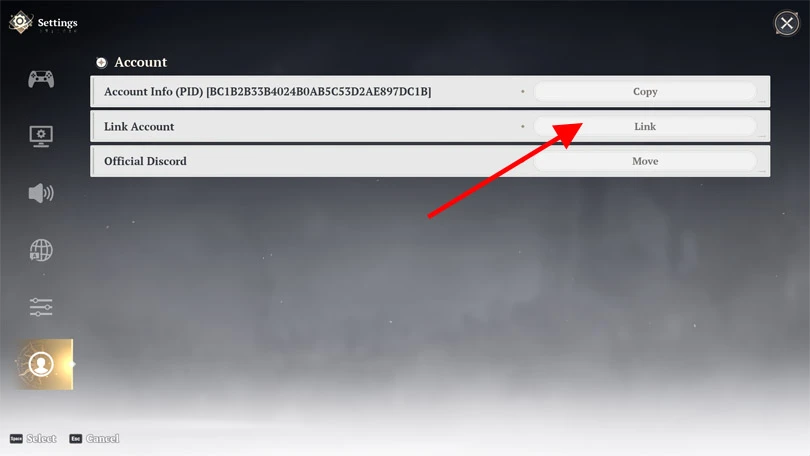
⚡ Mobi.gg tip: you can then manage your Netmarble and 7DS: Origin account by visiting the official website.
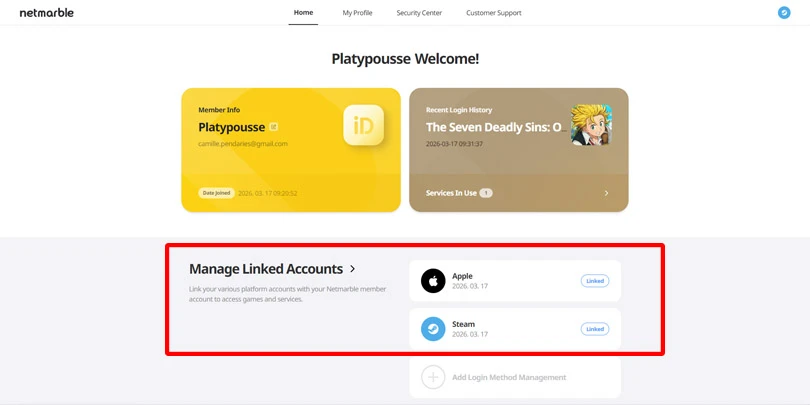
To recover your progress on the game, you'll first need to link your Seven Deadly Sins: Origin account, following the previous tutorial. Are you done? Here's how to transfer your savegame:
To round off our guide to linking your 7DS: Origin account, here's a troubleshooting FAQ:
Linking your Seven Deadly Sins: Origin account will only take a few minutes, and it's well worth the effort. So don't hesitate!
Follow us on our social networks to stay on top of mobile gaming news wherever you are!


The Seven Deadly Sins: Origin Spirit Plant is one of the resources you'll need to harvest during your daily missions. But where can you find it? Here's where to...
The Seven Deadly Sins: Origin Dragon Plant is essential for making effective recovery potions. But where can you find it? Here's where to find it in Britannia,...

There are a wide variety of resources to collect in 7DS: Origin, and some of them are quite rare. Looking for Seven Deadly Sins: Origin Lightdrop flower essence...

Are you looking for Seven Deadly Sins: Origin Evening Primrose? This resource is needed to complete Liones' missions and upgrade Bug equipment. Here's where yo...

The open world of Britannia is vast to explore. To go faster, you need to unlock a mount, and one of the mounts available is Mach, a Seven Deadly Sins: Ori...

Cooking in 7DS: Origin is an essential feature! The food you prepare gives you buffs and heals you. In this guide, I'll explain how to cook Seven Deadly Si...