




 EN
EN


The Seven Deadly Sins: Origin



Written by
Seven Deadly Sins: Origin is much more than an RPG inspired by the manga licence: it's an open world where exploration and dynamic combat are at the heart of the gameplay. To run it on your machine, you need the necessary resources. Can your machine handle it? Here are the Seven Deadly Sins: Origin system requirements for Android, iOS, PC and PS5.
Are you planning to play Seven Deadly Sins: Origin on a PC? If so, here are the recommended minimum 7DS: Origin system requirements on a Windows PC:
| Component | Minimum configuration | Recommended configuration |
|---|---|---|
| Operating system | Windows 10 or 11 64 Bits | Windows 10 or 11 64 Bits |
| Processor |
Intel Core i7-9700 AMD Ryzen 5 5500 |
Intel Core i7-9700 AMD Ryzen 5 5500 |
| RAM | 16 GB | 32 GB |
| Graphics card | NVIDIA GeForce GTX 1060 6 GB |
NVIDIA GeForce RTX 2070 8 GB AMD Radeon RX 5700 XT0 |
| Available space | 30 GB or more | 30 GB or more |
Seven Deadly Sins: Origine can be played on PC via Steam.
⚡ Mobi.gg's tip: install the game on an SSD rather than an HDD hard drive, otherwise loading times are likely to be quite long...!
If your current configuration isn't up to the task of running 7DS: Origin, here's my advice on how to make the game run more smoothly:
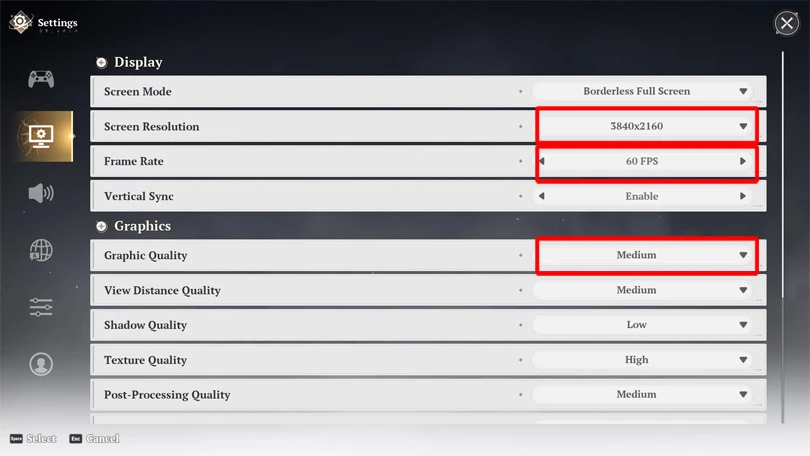
Even though this is an open world game, don't worry: it's not the most demanding. Here is the minimum and recommended Seven Deadly Sins: Origin system requirements:
| Component | Minimum configuration | Recommended configuration |
|---|---|---|
| Operating system | Android 10.0 or HarmonyOS 2.0.0 | Android 11.0 or HarmonyOS 4.0.0 |
| Processor | Snapdragon 855, Dimensity 1000, Kirin 9000S | Snapdragon 8+ Gen1, Dimensity 9000, Kirin 9000S |
| Memory | 6 GB | 8 GB memory |
| Storage | 25 GB storage | 25 GB |
⚡ To go further : if your configuration is a little weak, you can also go to the game settings to lower the quality of the graphics and FPS.
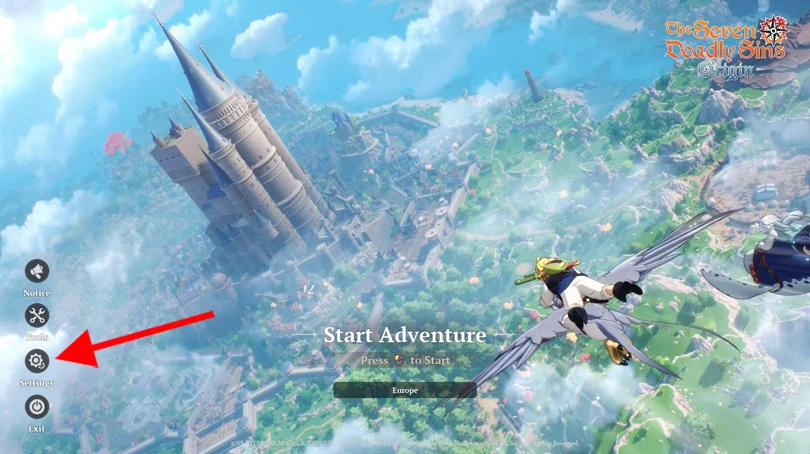
The recommended Seven Deadly Sins: Origin system requirements for iPhone and iPad mainly concerns recent models. Older models may suffer when you launch the game.
| Component | Minimum configuration | Recommended configuration |
|---|---|---|
| Operating system | iOS 15.0, IPadOS 15.0 or later | iOS 15.0, IPadOS 15.0 or later |
| Models | iPhone 12 | iPhone 15 Pro |
| Memory | 6 GB | 8 GB |
| Available space | 25 GB | 25 GB |
Same advice as above: go to the settings and lower the FPS if your iPhone or iPad isn't powerful enough to handle optimum performance.
You can play 7DS: Origin on the PS5 or PS5 Pro, regardless of configuration. But be careful: you'll need 30GB of storage space , or more!
We've got a few tips to help you boost your Seven Deadly Sins: Origin system requirements on Android, iOS or PC:
You now know the minimum recommended Seven Deadly Sins: Origin system requirements for running the game on your mobile, PC or PS5. And believe me, even with a reduced configuration, you're going to enjoy your experience of the game and the exploration of Britannia. And to get even more out of the game, don't forget to pick up our 7DS: Origin codes! We'll be updating it daily. We've also put together the Seven Deadly Sins: Origin tier list for you!
Follow us on our social networks to stay on top of mobile gaming news wherever you are!



The Seven Deadly Sins: Origin Spirit Plant is one of the resources you'll need to harvest during your daily missions. But where can you find it? Here's where to...

The Seven Deadly Sins: Origin Dragon Plant is essential for making effective recovery potions. But where can you find it? Here's where to find it in Britannia,...

There are a wide variety of resources to collect in 7DS: Origin, and some of them are quite rare. Looking for Seven Deadly Sins: Origin Lightdrop flower essence...

Are you looking for Seven Deadly Sins: Origin Evening Primrose? This resource is needed to complete Liones' missions and upgrade Bug equipment. Here's where yo...

The open world of Britannia is vast to explore. To go faster, you need to unlock a mount, and one of the mounts available is Mach, a Seven Deadly Sins: Ori...

Cooking in 7DS: Origin is an essential feature! The food you prepare gives you buffs and heals you. In this guide, I'll explain how to cook Seven Deadly Si...