













Written by
If you are looking to contact KartRider: Drift customer support, it's logical that you're experiencing problems or have questions. In this guide, we explain how to report bugs and players, but also how KartRider: Drift on mobile and PC.
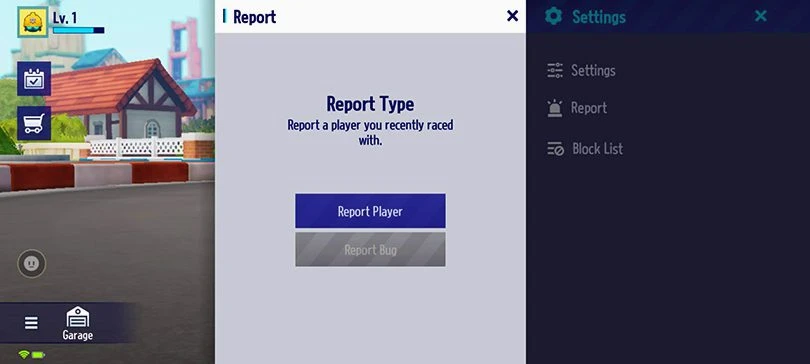
The easiest way to report problems to KartRider: Drift customer support is to use the in-game feature. To do this, once in the main menu, select the Settings button, then Report and the type of report.

For example, you can report a bug disconnection from a game or a display or text problem. If you come across toxic players in the chat or who are not participating in the game, you can also report this information to the developers so that they can adjust the technical problems and sort out the players to clean up the community.
In fact, we've written a KartRider: Drift beginner guide to help you get the basics right and start your driving career in the best possible way with our tips and tricks.
If you want to contact the KartRider: Drift customer support, head over to the game's official website. First of all, we advise you to consult the FAQ to go through the already existing and solved tickets. Indeed, maybe you are not the first one to encounter this problem and there is already a solution.
To send a request to KartRider: Drift customer support service, you need to log in to your Nexon account. If you don't have one, you can quickly create one using your Google, Apple, Facebook or Twitter account.

Then go to the Support section via the menu, which will open in a new tab. In the menu at the top of the page, click on Send a request and select the reason for your message:
In the next part of the KartRider: Drift customer support form, select your platform, specify the subject and write your message. Feel free to include attachments such as screenshots to help the Nexon team respond to your request as efficiently as possible.
This is for this guide to contact KartRider: Drift customer support on mobile and PC. Now you know how to help the developers fix their issues and manage their community.
Follow us on our social networks to stay on top of mobile gaming news wherever you are!
Need help solving Pedantle #1497 of June 23, 2026? Then you've come to the right place. Here you'll find clues and hints to help you find the Wikipedia page of...
Need help solving Pedantle #1496 of June 22, 2026? Then you've come to the right place. Here you'll find clues and hints to help you find the Wikipedia page of...
Need help solving Pedantle #1495 of June 21, 2026? Then you've come to the right place. Here you'll find clues and hints to help you find the Wikipedia page of...
Need help solving Pedantle #1494 of June 20, 2026? Then you've come to the right place. Here you'll find clues and hints to help you find the Wikipedia page of...
Need help solving Pedantle #1493 of June 19, 2026? Then you've come to the right place. Here you'll find clues and hints to help you find the Wikipedia page of...
Need help solving Pedantle #1492 of June 18, 2026? Then you've come to the right place. Here you'll find clues and hints to help you find the Wikipedia page of...
Leave a comment
Your email address will not be published. Required fields are marked with*.